
How Can I Add More Data to My Infimobile Plan?
Craving more data for your Infimobile plan? Look no further! Infimobile lets you supercharge your connectivity in a snap. This guide reveals how to jump into Quick Recharge, choose the ideal data add-on, and keep your online adventures going strong with a fast, no-fuss process!
Here’s how to include add-ons to your plan:
Step 1 :Sign in to your Infimobile account and navigate to the Quick Recharge section and input your mobile number twice to confirm.
Step 2 :After entering your mobile number, your current plan details will appear and You’ll see five categories .
Renew /Upgrade Plan
Enroll in Auto Renewal
Purchase Data Add-On
Enable International calling
Enable Hotspot
Step 3 : Go to the "Purchase Add-Ons" section. We offer two add-ons—1GB and 3GB. Choose the add-on that suits your needs.
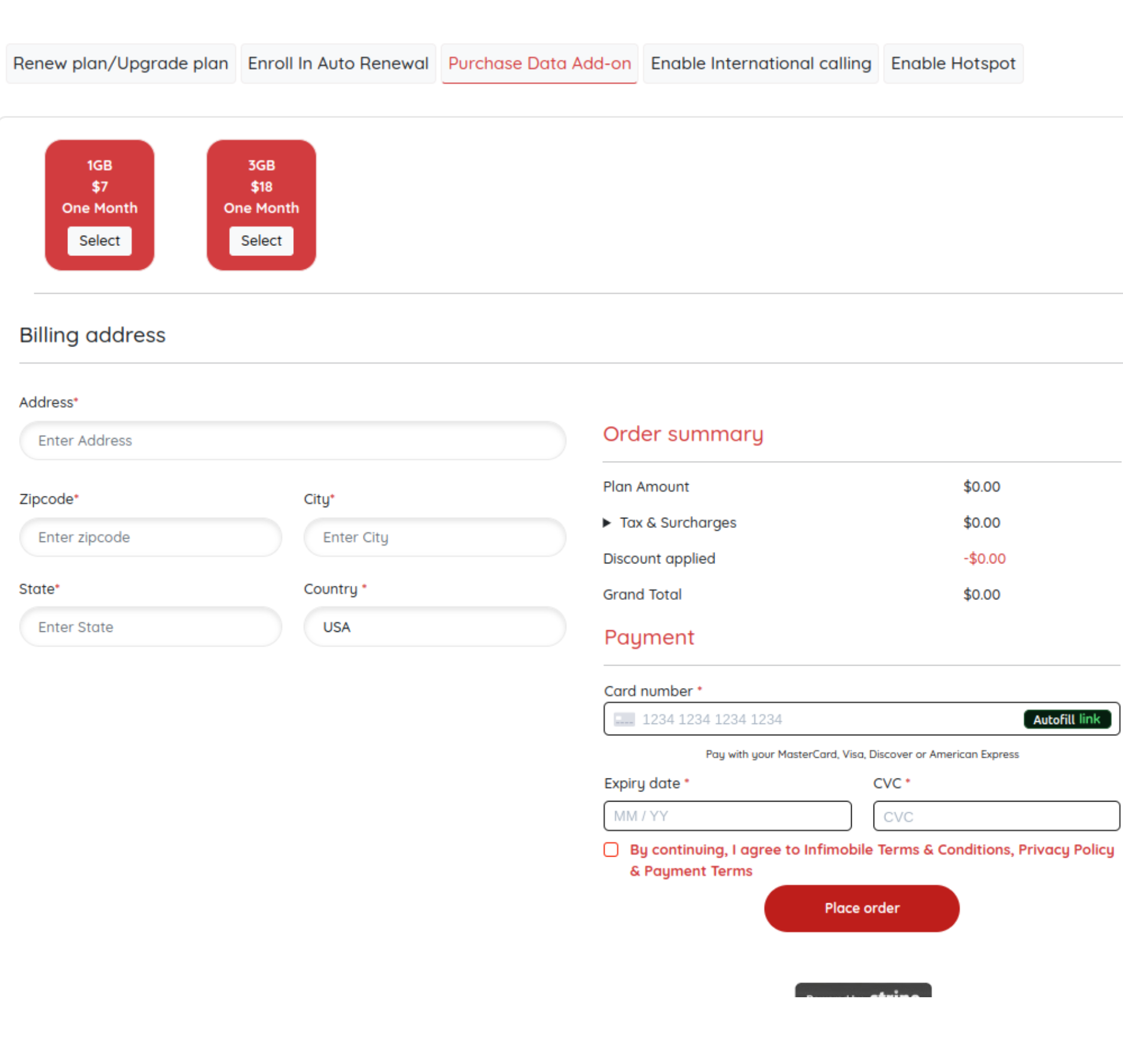
Step 4 :Please provide your billing address and enter your card details to complete the payment process.
Step 5: After payment is processed, the data add-on will be applied to your plan.
Need Help?
If you encounter any issues during the purchasing add-on process ,feel free to reach out to our customer support (855) 484-1855 / (855) 686-0102 or email support@infimobile.com for assistance.